
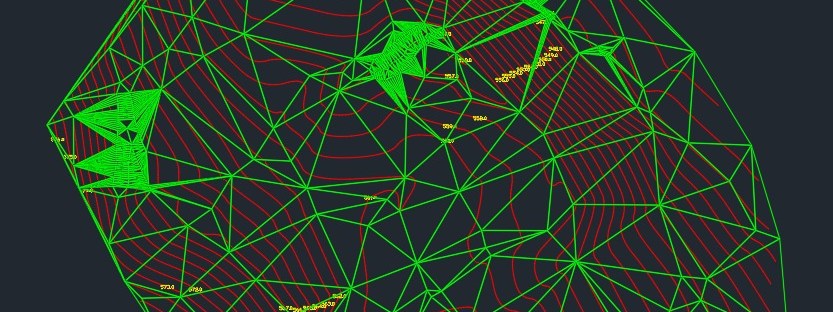
Automating TIN Creation and Contour Extraction Using Python and Breaklines
Generating Triangulated Irregular Networks (TINs) and extracting contours are crucial tasks in geospatial analysis and civil engineering. This article presents a Python script that automates TIN creation and contour extraction from DXF files containing 3D points and breaklines. The script integrates several libraries to process the data, generate triangulations, and export the results to DXF format.
Overview of the Python Script
The script performs the following tasks:
- User Input Acquisition:
- Prompts the user to specify the contour interval.
- Allows file selection through a graphical interface.
- Data Extraction from DXF Files:
- Reads 3D point data.
- Extracts breaklines, which are used to preserve terrain features.
- Breakline Densification:
- Adds interpolated points along breaklines to improve triangulation accuracy.
- TIN Generation:
- Utilizes Delaunay triangulation to create a mesh incorporating breaklines.
- Contour Extraction:
- Generates contour lines at specified intervals.
- Merges and smooths contour lines using Chaikin’s algorithm.
- Visualization and Export:
- Displays the generated contours.
- Exports the contours and TIN to a DXF file.
You can try the script here: Online creation of contours with optional breaklines
Script Breakdown
1. Getting User Inputs
contour_interval = float(input("Enter contour interval (e.g., 0.5 for half meter intervals): "))
This section prompts the user to define the contour interval, ensuring flexibility based on project requirements.
2. Reading DXF Data
points, breaklines = read_dxf_data(input_file)
Using the ezdxf library, the script extracts 3D point coordinates and breaklines from the DXF file.
3. Breakline Densification
densified_points = densify_breaklines(breaklines, 0.5)
Breaklines are densified to enhance the accuracy of the triangulation process.
4. TIN Creation
tri, all_points = create_triangulation(points, densified_points)
The scipy.spatial.Delaunay function performs triangulation using combined point and breakline data.
5. Contour Generation
contours_with_levels = generate_contours_from_tin(tri, all_points, contour_interval, smooth=True, iterations=3)
Contours are generated by interpolating elevation values and can be optionally smoothed.
6. Visualization and Export
plot_contours(all_points, contours_with_levels)
export_to_dxf(contours_with_levels, tri, all_points, output_file)
Contours are visualized using matplotlib and exported to DXF for further use in CAD software.
Running the Script
To use the script:
- Run the script in a Python environment.
- Select the input DXF file when prompted.
- Specify the desired contour interval.
- Review the generated contour plot.
- Locate the exported DXF file for further analysis.
Conclusion
This Python script streamlines the process of TIN creation and contour extraction, offering a powerful and automated solution for geospatial professionals. By leveraging popular libraries such as ezdxf, scipy, and shapely, it provides accurate and customizable results that integrate seamlessly into CAD workflows.
Feel free to modify the script to suit specific project needs and enhance geospatial analysis capabilities!

 topometrics.gr